


Sanad Fleet Agents
On-robot agents that report each Unitree robot's state to the YS Lootah fleet
server. One agent per robot type (G1 · R1 · Go2), each a self-contained
Docker image with a user-level systemd auto-start service, deployed and
managed over SSH by a single script — no docker-compose, no sudo on the robot.
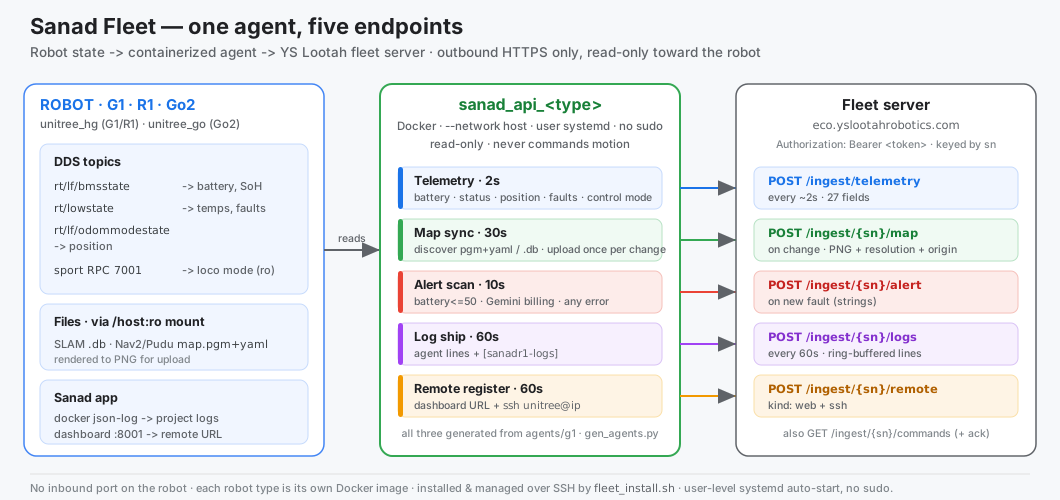
Full topic-by-topic data flow and payload schema: PIPELINE.md.
At a glance
- One agent = one service = everything. Each robot runs a single container that streams telemetry and uploads maps, ships logs, raises alerts, and registers its dashboard — across five endpoints.
- Read-only toward the robot. It reads DDS + files; it never commands motion.
- Outbound HTTPS only. No inbound port is opened on the robot; every request
carries
Authorization: Bearer <token>and is keyed by the robot's serial (sn). - One source of truth.
agents/g1/is canonical;r1andgo2are generated from it (tools/gen_agents.py). You never hand-edit r1/go2, and never edit on the robot.
| endpoint | when | what |
|---|---|---|
POST …/ingest/telemetry |
every ~2 s | 27 fields — identity, software/firmware, battery(+detail), motor temps, storage, status, position, control mode, faults, + status of map/logs/alerts/remote |
POST …/ingest/{sn}/map |
on change | saved nav map → PNG + resolution + origin (also RTAB-Map .db) |
POST …/ingest/{sn}/alert |
on new fault | battery ≤ 50 %, Gemini-billing, any error (as strings) |
POST …/ingest/{sn}/logs |
every 60 s | the agent's own lines + the robot's Sanad app logs |
POST …/ingest/{sn}/remote |
every 60 s | dashboard URL (web) + ssh unitree@<ip> (ssh) |
(A GET …/ingest/{sn}/commands channel also exists; remote mode-switching is
deliberately not built — status only. See §2.)
Table of contents
- Directory layout
- The agent
- What it reports (the 27 fields)
- Maps: discovery & upload
- Prerequisites
- Quick start
- How a deploy works
- Installer reference
- The auto-start service (systemd)
- Configuration reference
- Per-robot specifics
- The fleet test server
- Fleet inventory
- Troubleshooting
- Security notes
1. Directory layout
Project/fleet/
├── README.md                 ← this file
├── PIPELINE.md               ← end-to-end data-flow + payload schema
├── diagram.svg  deploy.svg   ← the two diagrams in this doc
├── fleet_install.sh          ← deploy / manage / remove over SSH (interactive + scriptable)
├── fleet_test_server.py      ← workstation stand-in for the fleet server (for tests)
├── tools/
│   └── gen_agents.py         ← regenerates r1 + go2 from the canonical g1
├── tests/                    ← mock capture + one-shot map export helpers
└── agents/
    ├── g1/                   ← CANONICAL source (edit here)
    │   ├── sanad_api_g1.py
    │   ├── Dockerfile        (DDS: CycloneDDS + unitree_sdk2py)
    │   ├── vendor/           (unitree_sdk2py wheel + crc libs)
    │   ├── requirements.txt · docker-compose.yml (local use only) · .env.example
    ├── r1/                   ← generated · unitree_hg · R1 FSM ids · eth10
    │   ├── sanad_api_r1.py · Dockerfile (DDS: CycloneDDS + unitree_sdk2py) · vendor/ · .env.example
    └── go2/                  ← generated · unitree_go · ⚠ unverified on hardware
        └── sanad_api_go2.py · Dockerfile · vendor/ · .env.example
Golden rule: edit
agents/g1/, then runpython3 tools/gen_agents.pyto regenerater1andgo2. The installer rsyncs the selected agent to the robot; files on the robot are never edited by hand.
2. The agent
| agent (type) | robot | DDS family | notes |
|---|---|---|---|
sanad_api_g1 (g1) |
Unitree G1 | unitree_hg |
canonical source |
sanad_api_r1 (r1) |
Unitree R1 EDU | unitree_hg |
generated from g1 · R1 FSM ids 0/1/4/811 · eth10 |
sanad_api_go2 (go2) |
Unitree Go2 | unitree_go |
generated from g1 · battery nested in LowState.bms_state · ⚠ unverified on hardware |
All three run the same five loops (telemetry 2 s · map 30 s · alert scan 10 s · log ship 60 s · remote register 60 s). They differ only in the DDS layer and a few robot-specific ids — which is exactly what the generator handles.
Design principles
- No ROS. Maps are read from files; robot state from DDS via
unitree_sdk2py. - Read-only. The control panel reports the loco mode but cannot switch it —
mode switching can drop the robot, so it is intentionally not built (
CONTROL_ENABLE=0). - Never crash the loop. Every tick is wrapped; a heartbeat keeps the robot "online" when state is momentarily unreadable.
- Idempotent uploads. Maps re-send only when their content changes.
- Resilient shipping. Failed log ships are requeued (last ~400 lines) until the server accepts them.
3. What it reports (the 27 fields)
Every telemetry POST is one JSON object. Grouped for readability:
| group | fields |
|---|---|
| identity | sn · name · mac · brand · type · model |
| system | software{ros,os,os_version,kernel,arch,python,agent} · firmware{board,l4t,kernel,robot,bms} |
| power | battery · charging · battery_detail{voltage_v,current_a,temp_c,soh,cycles} |
| health | motor_temp{max,avg,min} (null = not receiving) · storage{total_gb,free_gb,used_percent} · faults[] (strings) |
| state | status (idle/moving/charging/offline) · position{x,y} · control{fsm_id,mode,armed,walk_ready,teleop_active,…} |
| sub-status | map{…} · logs{…} · project_logs · remote{…} · alerts{…} |
| timing | time · started_at · last_start · uptime_s · ts |
control.mode is a friendly label of the loco FSM (R1: zero_torque/damp/lock/
running; G1: running/lock/squat/…), read from the Sanad dashboard status API
— no DDS command, no motion. Full schema in PIPELINE.md.
4. Maps: discovery & upload
The agent finds saved maps on the robot and uploads each once per content change. It understands two formats:
slam_toolbox/ Nav2 / Pudu sets —map.pgm+map.yaml→ rendered to an image JSON (pure-stdlib PGM→PNG + resolution + origin). Small; always uploads.- RTAB-Map
.db— sent as-is, but skipped if larger than the server's ~8 MB cap (MAP_MAX_UPLOAD_MB, default 7) with a note inmap.error.
Where it looks (each existing dir is scanned for *.pgm + *.yaml and *.db):
MAPS_DIR(/data/maps) — the robot's primary SLAM/nav maps dir (installer probes it).EXTRA_MAP_DIRS(/data/nav2_maps) — a separate Nav2/Pudu deploy-maps dir (e.g.~/r1_nav2_docker/maps) mounted alongside. The installer auto-detects and mounts it, so converted Pudu office maps are discovered and uploaded too.
Two conveniences:
- The Pudu converter emits a plain map and a keepout-baked twin; when both exist the agent keeps only the baked one, so the server gets one canonical map.
--map-onlyuploads discovered maps once with no DDS and no telemetry — handy to push a new map without disturbing a live feed:docker run --rm --network host --env-file .env \ -e EXTRA_MAP_DIRS=/data/nav2_maps -v <host-maps>:/data/nav2_maps:ro \ sanad-api-<type>:latest --map-only --force
Map status is mirrored into every telemetry post as
map:{uploaded,state,maps_found,last_map,error,checked_ts}.
5. Prerequisites
Workstation (deploy host)
bash,ssh,rsync,python3.- SSH key access to each robot —
ssh unitree@<ip>must work without a password (the installer usesBatchMode=yes). - On the same network as the robots (they POST back to the workstation during
test).
Robot
- Docker (Engine ≥ 20); the
unitreeuser in thedockergroup. - Internet at build time (base image; r1/go2 also build the DDS stack).
systemduser bus (standard on Ubuntu 20.04+). No sudo needed.- Architecture: arm64 (Jetson / backpack). Images build natively on the robot.
6. Quick start
cd Project/fleet

# Interactive — asks robot type, IP, and (if new) name + token + server:
./fleet_install.sh

# …or scripted against the real fleet server (FIRST install — needs the token):
./fleet_install.sh install r1 10.255.254.82 \
    --sn E39N4000Q6D7E70F --name r1_82 \
    --token <device-token> --server-url https://eco.yslootahrobotics.com

# UPDATE an already-installed robot (reuses the token already on it):
./fleet_install.sh install r1 10.255.254.82 \
    --sn E39N4000Q6D7E70F --name r1_82 \
    --server-url https://eco.yslootahrobotics.com --keep-token

# Inspect / manage:
./fleet_install.sh data    r1 10.255.254.82   # what it's currently sending
./fleet_install.sh logs    r1 10.255.254.82   # live docker logs
./fleet_install.sh status  r1 10.255.254.82   # systemd + container state
./fleet_install.sh test    r1 10.255.254.82   # e2e against the workstation server
./fleet_install.sh uninstall r1 10.255.254.82 # remove everything
7. How a deploy works
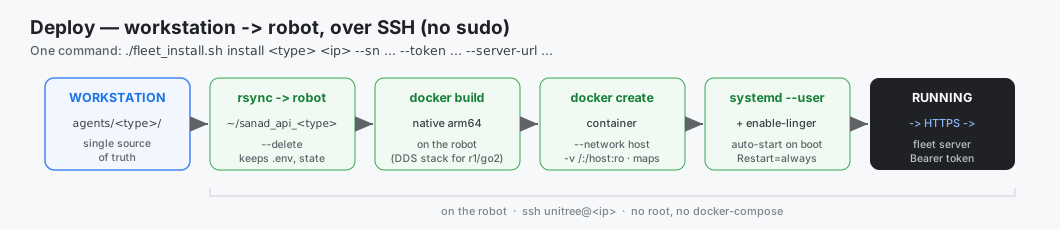
rsync agents/<type>/  →  unitree@<ip>:~/sanad_api_<type>/   (--delete; keeps .env + state)
write ~/sanad_api_<type>/.env                               (SERVER_URL, TOKEN, SN, iface, …)
ssh: docker build  -t sanad-api-<type>:latest .             (native arm64)
ssh: docker create --name sanad-api-<type> <run-args>       (no docker restart policy)
write ~/.config/systemd/user/sanad-api-<type>.service
ssh: loginctl enable-linger ; systemctl --user enable --now sanad-api-<type>
run-args (all agents): --network host --env-file …/.env plus read-only mounts:
-v /:/host:ro (real disk/firmware + Sanad json-log), -v <maps>:/data/maps:ro,
-v <web_data>:/data/web_data:ro, -v <nav2 maps>:/data/nav2_maps:ro (when present),
and -v …/state:/data/state (rw, upload fingerprints).
--network host is required so the robot's DDS multicast is visible (it doesn't cross
a NAT bridge) and so the agent can reach the Sanad dashboard on 127.0.0.1.
8. Installer reference
Interactive (no arguments)
./fleet_install.sh
- Which robot?
1) g1 2) r1 3) go2 - Robot IP + SSH user (default
unitree; verifies SSH works). - Detects whether it's already installed (unit file or container) and branches:
- Installed → menu: show data · status · logs · reinstall · uninstall · quit.
- Not installed → prompts SN (required), server (URL or auto-detected IP), token, then installs.
Scriptable
./fleet_install.sh <command> <g1|r1|go2> <ip> [options]
| command | action |
|---|---|
install |
rsync → build → create → install + enable the systemd service (also the update path — see below) |
uninstall |
disable/remove service, container, image, and ~/sanad_api_<type> — ⚠ destroys the token, see below |
status |
systemd service state + container state |
data |
recent telemetry/map log lines (what it's sending) |
logs |
docker logs -f (live tail) |
test |
start the workstation server, push a real post from the robot, verify (PASS/FAIL) |
install requires the essentials to be explicit:
./fleet_install.sh install <type> <ip> --sn <serial> --token <token> \
    --server-url https://eco.yslootahrobotics.com [--post <path>] [--name <display>]
| option | default | meaning |
|---|---|---|
--sn SERIAL |
required | robot's REAL serial — keys it on the server (e.g. E39N4000Q6D7E70F) |
--name NAME |
<model>_<last-octet> |
friendly display name (r1_82, g1_58) |
--token TOK |
test-token |
device bearer token — ⚠ omitting it on an update overwrites the real token with test-token; use --keep-token |
--keep-token |
off | updating an installed robot: reuse the DEVICE_TOKEN already in the robot's .env (never leaves the robot) |
--server-url URL |
— | full HTTPS fleet server → VERIFY_TLS=1 |
--post PATH |
agent default | override the telemetry ingest path |
--server-ip IP |
auto (route to robot) | use the local test server instead → VERIFY_TLS=0 |
--port N |
8799 |
test-server port (with --server-ip) |
--user USER |
unitree |
SSH user on the robot |
--keep-server |
off | (test) leave the workstation test server running |
Updating a robot that's already installed
install is the update path — it rsyncs the new code, rebuilds (Docker layer
cache makes it fast: only the .py layer changes), recreates the container and
restarts the service. Use --keep-token so you don't need the token again:
./fleet_install.sh install g1 10.255.254.58 \
    --sn E21D6000PB89GF88 --name g1_58 \
    --server-url https://eco.yslootahrobotics.com \
    --keep-token
Always pass
--keep-tokenwhen updating.--tokendefaults totest-token, so an update without either flag silently overwrites the robot's real token and the fleet feed dies with401.
--keep-token copies the robot's current .env, writes the fresh one with a
placeholder, then splices the old DEVICE_TOKEN line back on the robot by
line surgery (no shell interpolation) — so any token characters are safe and the
token is never transferred or printed. Downtime is a few seconds.
⚠ uninstall destroys the device token
uninstall does rm -rf ~/sanad_api_<type>, which includes .env — the only
copy of DEVICE_TOKEN on the robot. After uninstalling you cannot reinstall
without a token from the fleet admin. If you intend to reinstall, back it up
outside the install dir first:
# BEFORE uninstall — stash the token somewhere rm -rf can't reach
ssh unitree@<ip> 'cp ~/sanad_api_<type>/.env ~/.sanad_api_<type>.env.bak'

./fleet_install.sh uninstall <type> <ip>

# BEFORE reinstall — restore it, then --keep-token picks it up
# (rsync uses --exclude '.env', so a pre-placed .env survives the install)
ssh unitree@<ip> 'mkdir -p ~/sanad_api_<type> && cp ~/.sanad_api_<type>.env.bak ~/sanad_api_<type>/.env'
./fleet_install.sh install <type> <ip> --sn <serial> --server-url <url> --keep-token

ssh unitree@<ip> 'rm -f ~/.sanad_api_<type>.env.bak'   # tidy up the extra secret copy
9. The auto-start service (systemd)
Because the robots have no passwordless sudo, the agent runs as a user-level systemd service (no root):
- Unit:
~/.config/systemd/user/sanad-api-<type>.service - Boot auto-start via
loginctl enable-linger <user>(allowed without sudo). - systemd owns the container lifecycle:
[Service] Type=simple Restart=always RestartSec=5 ExecStart=/usr/bin/docker start -a sanad-api-<type> ExecStop=/usr/bin/docker stop -t 10 sanad-api-<type> - Created with
docker create(no docker restart policy) so systemd is the single owner;Restart=alwaysalso covers the boot race where the user manager starts beforedockerdis ready.
On the robot:
systemctl --user status  sanad-api-r1
systemctl --user restart sanad-api-r1
journalctl --user -u sanad-api-r1 -f      # or: docker logs -f sanad-api-r1
What uninstall removes (verified end-to-end on the G1):
systemctl --user disable --now sanad-api-<t>   # stop + un-enable
rm -f ~/.config/systemd/user/sanad-api-<t>.service
systemctl --user daemon-reload
systemctl --user reset-failed sanad-api-<t>    # ← clears the stale "failed" entry
docker rm -f sanad-api-<t> ; docker rmi sanad-api-<t>:latest
rm -rf ~/sanad_api_<t>                         # ← includes .env (the token!)
reset-failed matters: stopping the unit leaves docker start -a exiting
non-zero, so without it systemd keeps a not-found failed entry in its runtime
state — a clean uninstall would still look like a broken service in
systemctl --user --failed forever.
10. Configuration reference
Config is env-only; the installer writes ~/sanad_api_<type>/.env. Every key is
documented in each agent's .env.example.
Core (all agents)
| var | default | meaning |
|---|---|---|
SERVER_URL ✅ |
— | fleet server base URL |
DEVICE_TOKEN ✅ |
— | bearer token (per robot) |
SN |
<type>_0000 |
robot's real serial (server key) |
ROBOT_NAME |
<model>_<octet> |
friendly display name |
ROBOT_BRAND / ROBOT_TYPE / ROBOT_MODEL |
unitree / humanoid|dog / g1|r1|go2 |
identity |
POLL_INTERVAL |
2 |
telemetry cadence (s) |
VERIFY_TLS |
1 |
verify server TLS (0 for the local test server) |
HTTP_TIMEOUT |
30 |
per-request timeout (s) |
SOFTWARE_ROS |
foxy |
reported in software.ros |
DDS / telemetry
| var | default | meaning |
|---|---|---|
DDS_INTERFACE |
r1 eth10 · else eth0 |
NIC that sees robot DDS |
DDS_DOMAIN |
0 |
DDS domain id |
MAC_INTERFACE |
= DDS_INTERFACE |
NIC whose MAC is reported |
G1_READ_FSM |
0 |
read loco FSM for status (read-only GET RPC) |
POSITION_SOURCE |
odom|none |
odom (DDS) · rosbridge · none |
ROSBRIDGE_URL |
ws://127.0.0.1:9090 |
position source when rosbridge |
MOTOR_TEMP_MAX |
85 |
°C → MOTOR_OVERTEMP fault |
Maps
| var | default | meaning |
|---|---|---|
MAPS_DIR |
/data/maps |
primary SLAM/nav maps mount |
EXTRA_MAP_DIRS |
/data/nav2_maps |
extra roots (colon-sep) for Nav2/Pudu pgm+yaml sets |
MAP_SELECT |
all |
all · active · newest |
MAP_POLL_INTERVAL |
30 |
map check cadence (s) |
MAP_MAX_UPLOAD_MB |
7 |
skip .db larger than this (server cap) |
MAP_UPLOAD_MODE |
multipart |
multipart · base64json |
DATA_DIR |
/data/web_data |
per-map places (waypoints) |
STATE_DIR |
/data/state |
upload-fingerprint + start-time state |
Alerts
| var | default | meaning |
|---|---|---|
LOW_SOC |
50 |
battery % → LOW_BATTERY fault + alert |
ALERT_SCAN_INTERVAL |
10 |
project-log scan cadence (s) |
ALERT_LOG_COOLDOWN |
300 |
per-signature re-alert gap (s) |
ALERT_LOG_PATTERNS |
Gemini-billing + error/critical/traceback | CODE=regex entries split by ;; (case-sensitive; use (?i) inline) |
ALERT_BACKFILL_BYTES |
8 MiB |
startup scan window so active errors alert on boot |
Logs · remote · control
| var | default | meaning |
|---|---|---|
LOGS_INTERVAL |
60 |
log-ship cadence (s) |
PROJECT_LOG_CONTAINER |
auto |
robot's Sanad container to tail (auto discovers it) |
PROJECT_LOG_PATH / _LABEL / _BACKFILL / _EXCLUDE |
— / — / 100 / access-log filter |
project-log overrides |
REMOTE_ENABLE |
1 |
register the dashboard URL + ssh |
REMOTE_PORTS |
8001,8014,8011-8013,8000,8080 |
dashboard ports to probe |
REMOTE_URL |
— | pin an explicit URL (e.g. a public tunnel) |
SSH_REGISTER / SSH_USER |
1 / unitree |
register ssh <user>@<ip> |
CONTROL_ENABLE |
0 |
remote mode-switch (motion) — off by design |
CONTROL_STATUS_URL |
— | Sanad /api/controller/status for read-only loco mode |
11. Per-robot specifics
R1 (live on production)
- DDS link is
eth10(=192.168.123.164); WiFi is the fleet LAN. - Battery from
rt/lf/bmsstate(BmsState_); coexists with the runningsanadr1app (DDS allows many readers). - Maps: VSLAM
~/r1_vslam_docker/data(RTAB-Map.db) and the converted Pudu office map in~/r1_nav2_docker/maps(mounted at/data/nav2_maps).
G1 (⚠ STANDING HOLD — stage only, do not deploy)
- Do not deploy to the new G1 until the hold is lifted; stage maps only.
- Saved maps live inside the
p4_Foxy_sanadnav container at~/marcus_nav2_test/maps(not host-mounted by default) — add a host bind-mount (and toweb/data/) so the agent can read them, or use a shared volume.
Go2 (⚠ unverified on hardware)
- Uses
unitree_go; battery is nested inrt/lowstate.bms_state(no separate BMS topic). Image builds and imports, simulate is correct — but confirm thebms_statecurrent sign (charge polarity) andsportmodestatefields on a real Go2.
12. The fleet test server
fleet_test_server.py stands in for the real fleet server so you can verify a deploy
end-to-end from the workstation.
PORT=8799 REQLOG=/tmp/fleet.jsonl python3 fleet_test_server.py
- Binds
0.0.0.0:8799;GET /ping→200(the reachability check the installer uses). - Accepts every ingest POST, logs each to
REQLOG, prints a live summary.
./fleet_install.sh test … starts it, triggers a post from the robot, asserts the
payload arrived, and prints PASS/FAIL.
13. Fleet inventory
| robot | IP | SSH | arch | DDS iface | SN (name) | status |
|---|---|---|---|---|---|---|
| R1 | 10.255.254.82 (wired 192.168.123.164) |
unitree (key) |
arm64 | eth10 |
E39N4000Q6D7E70F (r1_82) |
live on prod · office map uploaded |
| G1 | 10.255.254.58 |
unitree (key) |
arm64 | eth0 |
E21D6000PB89GF88 (g1_58) |
⚠ hold + offline (battery) |
| Go2 | (TBD) | unitree |
arm64 | eth0 |
— | unverified |
Workstation (deploy host + test fleet server): 10.255.254.83 (wlp4s0).
Production fleet server: https://eco.yslootahrobotics.com.
14. Troubleshooting
| symptom | cause / fix |
|---|---|
test: robot can't reach the workstation (http 000) |
same-subnet? open the port (sudo ufw allow 8799). |
| map: "0 maps" / nothing uploaded | no saved map, or maps aren't mounted — see §4 and §11 G1. |
telemetry POST failed … Connection refused |
target server down / wrong URL. Re-point: install … --server-url <real>. |
battery=null, status=offline forever |
DDS not seen. Wrong DDS_INTERFACE (R1 = eth10) or robot firmware down — check ip -o addr on the robot. |
| build very slow (r1/go2) | first build compiles CycloneDDS (minutes). Run detached: setsid bash -c 'cd ~/sanad_api_r1 && docker build -t sanad-api-r1:latest . >build.log 2>&1' </dev/null & then watch build.log. Layer cache survives reboots. |
| service didn't start after reboot | linger must be on: loginctl show-user <user> | grep Linger → Linger=yes (the installer sets it). |
| r1/go2 out of sync with g1 | you edited g1 without regenerating — run python3 tools/gen_agents.py. |
| after an update the server returns 401 | you ran install without --token or --keep-token, so .env got the default test-token. Re-run with --keep-token (if the real token is still on the robot) or --token <real>. |
| uninstalled and now can't reinstall (no token) | uninstall deletes ~/sanad_api_<type>/.env — the only token copy. Get a fresh token from the fleet admin, or restore a .env backup. Back it up before uninstalling next time (see §8). |
systemctl --user --failed shows a dead sanad-api-* after uninstall |
fixed — uninstall now runs reset-failed. On an old install, clear it once: systemctl --user reset-failed sanad-api-<type>.service. |
15. Security notes
- Outbound only. No inbound port on the robot; POSTs out over HTTPS with a per-robot bearer token.
- Least privilege. Runs as
unitree(docker group), user-level systemd, no root. Read-only toward the robot — no motion commands. - Token handling.
.envholds the device token, is never rsynced back, and is.gitignored. The installer writes it straight to the robot; it is never printed. - TLS.
VERIFY_TLS=1in production;0only for the local test server.